- Skills turn stable tasks into visible entries, so users do not need to rewrite long prompts every time.
- Type $ in the input box to choose manually visible skills and run them over the current source scope.
- Visible skill names use display_name, and built-in skills support localized display names.
- Custom skills should include SKILL.md and agents/openai.yaml with display and manual selection metadata.
1. Skills solve repeat tasks, not model selection
The skill library is for stable tasks: study notes, concept explanations, practice questions, meeting minutes, lesson drafts, discussion prompts, report structures, and similar repeatable outputs. Instead of rewriting a long prompt every time, users choose a clear task from the input box.
Skills do not automatically prove which model is best, and they should not promise output quality for every model. A friendlier product pattern is to show what the skill does, what source scope it expects, and what model strength is recommended.
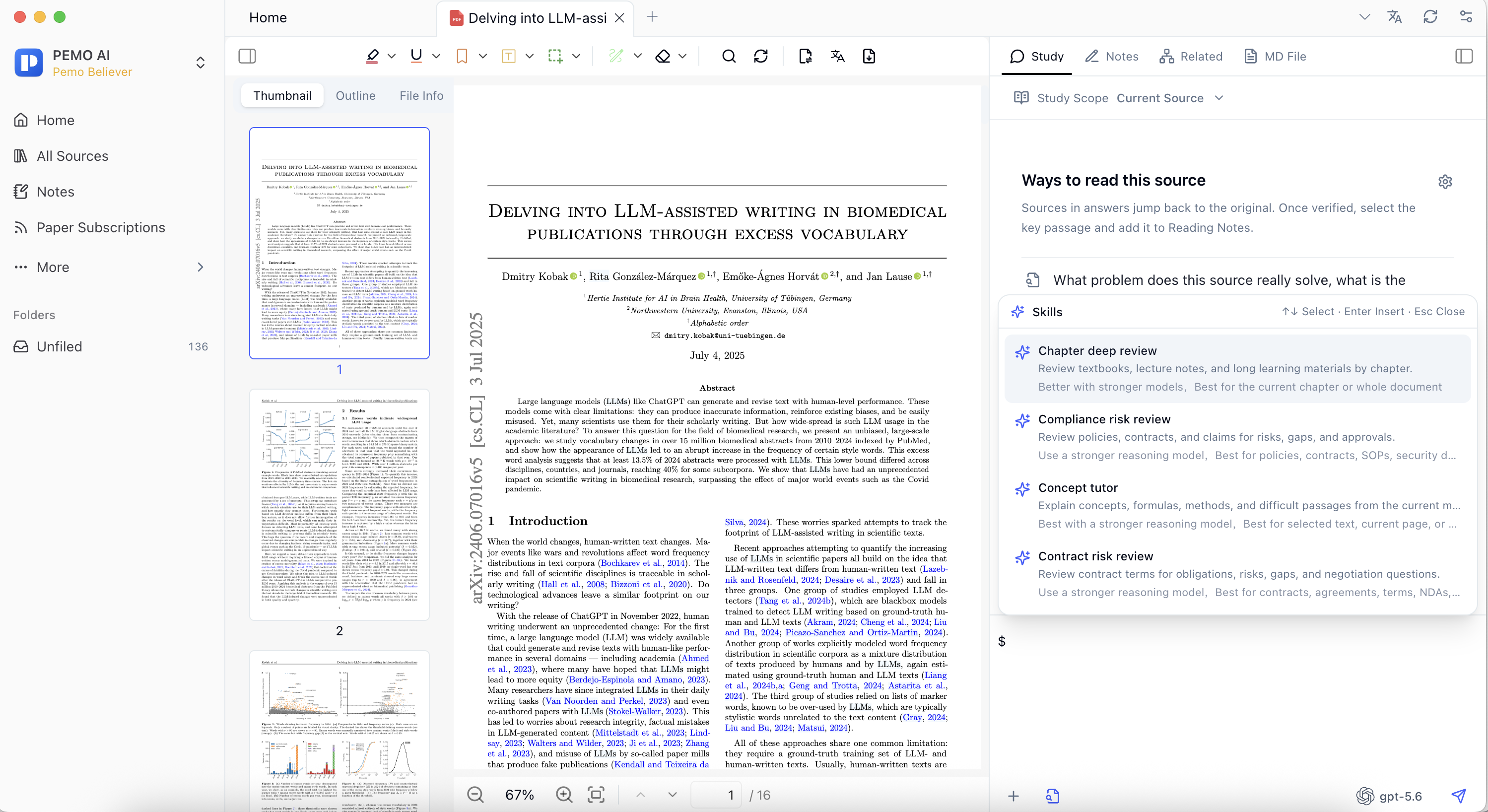
2. Choose skills from the input box or library
In Pemo, users can type $ in the input box to open the skill panel, or review available skills in Settings. The user-facing name should come from display_name; built-in skills should support localized display names so users do not see internal folder names.
A good skill should have:
- Clear input: current PDF, transcript, web page, note, or selected source scope.
- Stable output: notes, questions, outlines, discussion prompts, lesson drafts, or meeting minutes.
- Visible boundaries: what material it fits, what model strength helps, and what needs manual review.
3. Import custom skills by specification
Custom skills are useful for courses, podcast formats, team templates, or long-running research methods. Import a folder or .zip package that contains one skill folder and SKILL.md.
If the skill should be shown for manual selection, configure display metadata in agents/openai.yaml:
display_name: Podcast study notes
short_description: Turn the current podcast transcript into reviewable notes.
manual_select: true
default_prompt: Create study notes using only the current transcript.
After import, open a source or transcript, type $, and choose the skill.